Moon+ Reader
- 3.5
- Rating
- 10.00M
- Installs
- Free
- Price

 Analysis by App-foxy
I spent time with Moon+ Reader as a flexible reading app rather than treating it like a simple shelf for digital books. That distinction matters. Its appeal is not just opening an ebook; it is the amount of control it gives you over how reading feels on an Android device. The app sits in the Books & Reference category, comes from Moon+, and is available free of charge, with optional in-app purchases listed at $0.99 per item. For someone who reads regularly on a phone or tablet, that makes it worth examining closely instead of judging it by its brief store summary.
My overall impression is positive, but not universally enthusiastic. I like the way the reader can be adjusted around my habits, especially when I move between different books, file types, lighting conditions, and reading positions. At the same time, that flexibility creates a learning curve. A person who wants one obvious button for opening a book and another for turning pages may find the interface busier than expected. The main strength is control, while the main weakness is the effort needed to understand that control.
How the free model affects its value
The basic cost is easy to understand: Moon+ Reader is free to download and use, while optional purchases are available at $0.99 per item. I appreciate that this lets a curious reader test the experience without committing money first. The free entry point is especially useful if you are replacing a basic ebook viewer and want to discover whether detailed customization actually improves your reading.
You May Also Like

 Blood Strike: 2.5 Anniversary
Blood Strike’s Loadouts Turn Every Drop Into a Tactical Gamble
A close look at Blood Strike’s custom loadouts: how fast access to signature weapons reshapes its battle royale rhythm, rewards preparation, and narrows the gap between fights.

 Pandora - Music & Podcasts
Pandora’s Music Is Easy to Start, but Harder to Recover
Pandora’s strength is its low-effort path from a seed to a station. Its weak spot is how much confidence it asks you to place in connection, setup, and quiet recovery.

 8 Ball Pool
 Is Built on Rivalries, Rematches, and Routine
A close look at the rivalries, rematches, shared routines, and unanswered safety questions that turn a quick pool match into a persistent mobile community.

 Samsung Music
’s Quiet Strength Is Playing What You Already Own
Its reach comes less from spectacle than from dependable access to a personal library. That simplicity is both the app’s strongest retention engine and its ceiling.

 AccuWeather: Weather Radar
AccuWeather Review: A Quick, Clear Forecast for Everyday Decisions
For everyday plans, the best forecast is the one you can understand quickly. AccuWeather makes rain timing, radar, and local conditions easy to act on, with a few trade-offs.

 Hill Climb Racing
Why Hill Climb Racing Still Turns Crashes Into One More Run
A tiny car, a bumpy hill and one more upgrade: Hill Climb Racing keeps resurfacing because its simple chaos makes every near-miss feel personal.
More From Our News Desk
View All News


I would not describe the app as a paid product disguised as a trial. The free version is useful enough to judge its reading experience, navigation, and overall fit with your routine. However, the presence of optional purchases means you should decide what you need before paying for anything. If your goal is simply to read occasionally, the free access may be sufficient. If you want the complete set of conveniences associated with the app, the purchase decision becomes a question of how much you value refinement rather than whether the reader can open a book at all.
That distinction is important because ebook readers are often compared as though they all solve the same problem. A minimalist reader can already handle the basic act of reading. Moon+ Reader earns its place when you care about adjusting the experience repeatedly: changing the page appearance, making text easier on your eyes, or shaping controls around the way you hold your device. If you will never touch those settings, its extra depth may not translate into extra value.
The app carries an Everyone content rating, which makes it approachable for a broad household audience. It is also a mature project, released on August 7, 2010, and the current version is 10.6. Its minimum operating-system requirement is Android 5.0. Those details suggest a product designed for a wide range of Android devices rather than a reader limited to recent hardware. I still recommend checking how comfortable your particular screen is for long sessions, because the reading experience depends heavily on display size and ergonomics.
What you are really paying for
With this kind of app, optional spending is best understood as payment for convenience and polish, not for access to the idea of ebooks itself. Your books, sources, and reading habits determine much of the value. Moon+ Reader can make a personal library more pleasant to use, but it does not automatically make every ebook well formatted. A badly prepared file can still have awkward spacing, strange page breaks, or inconsistent headings.
I also would not choose it because a free app is automatically the cheapest long-term option. The relevant question is whether the app saves enough irritation to justify any optional purchase for your routine. Someone reading a few pages once a month may gain little. Someone reading every evening, switching between books, and repeatedly adjusting brightness or typography may feel the benefit much sooner.
What the reading experience delivers
Moon+ Reader feels most convincing when I treat it as a personal reading workspace. Instead of accepting one fixed presentation, I can approach a book with the expectation that its appearance can be shaped around me. That is valuable on mobile devices, where the same page can feel comfortable in a quiet room and tiring on a bright commute.
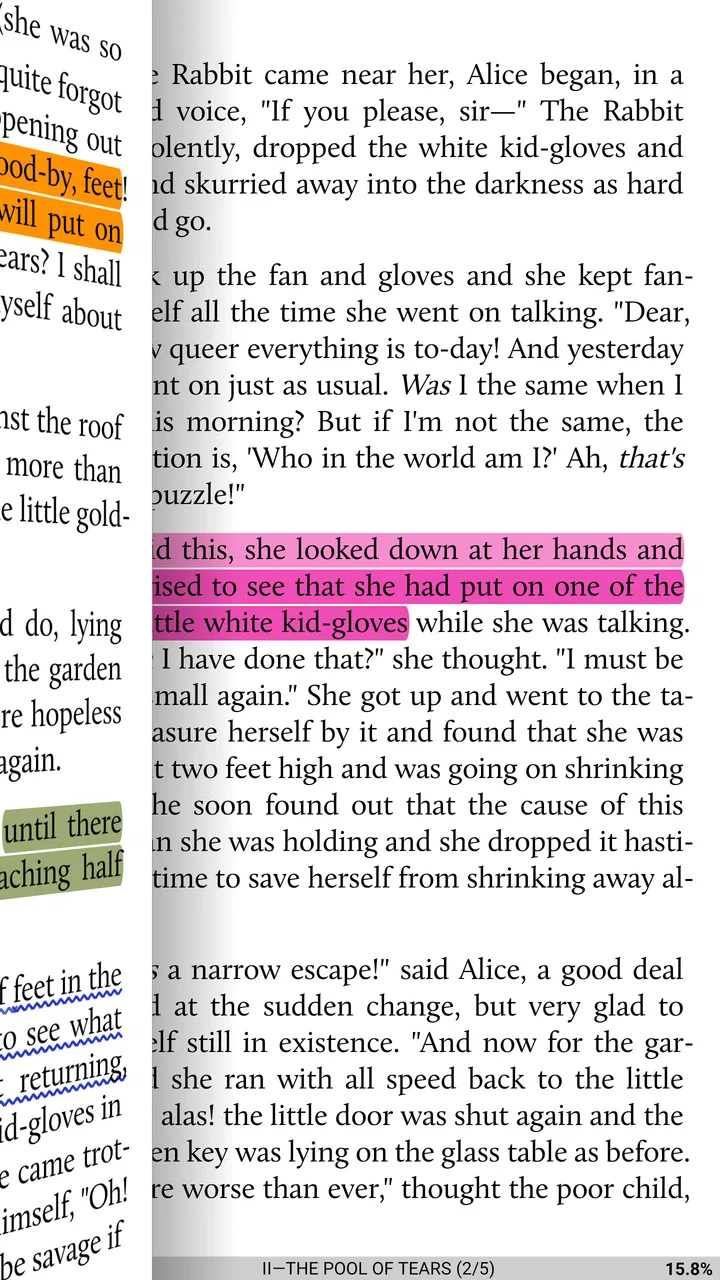
The app is particularly suited to readers who care about typography and page behavior. I found that this kind of control is not merely decorative. A comfortable text size can reduce the temptation to zoom constantly, while a suitable page layout can make a small screen feel less cramped. The best setup is personal, so I would spend a few minutes testing changes with a real chapter rather than deciding from a short sample.
One useful workflow is to create a “default reading setup” before importing a large collection. I would choose a text size that works without forcing frequent adjustments, set a background and contrast level that remain comfortable for longer sessions, and then test a book with headings, dialogue, and paragraphs of different lengths. This exposes formatting problems early and prevents the common mistake of changing settings separately for every title.
Another strength is the way the app can serve different reading moods. I might want a bright, high-contrast page during the day, then a softer presentation at night. The ability to adapt the reader means I am less dependent on the formatting choices made by whoever created the ebook. That does not eliminate every visual problem, but it gives me more ways to work around one.
Useful habits for managing a personal library
I recommend treating the library view as part of the reading system, not just a launch screen. When a collection grows, finding the next book becomes almost as important as displaying the current page. Keeping titles organized from the beginning is less frustrating than trying to repair a crowded shelf later. I would also avoid importing every file at once if you are still learning the app; adding a small group first makes it easier to understand how the library presents and sorts your material.
A practical everyday scenario is an evening reader who keeps several books in progress: fiction for relaxation, a reference title for quick consultation, and a longer nonfiction book for weekends. A basic reader can open all three, but Moon+ Reader is more appealing when the reader wants each one to feel distinct. The fiction book may benefit from a spacious page, the reference title from quick navigation, and the nonfiction book from a layout that makes longer sections easier to follow. The value comes from reducing repeated setup work.
I also see a good fit for students and self-directed learners who read outside a single commercial ecosystem. A dedicated bookstore app can be smoother if all your books come from that store, but Moon+ Reader makes more sense when your reading life is spread across personal documents and ebooks from different places. The trade-off is that you may need to take more responsibility for file organization and formatting.
Where it compares well with simpler alternatives
Compared with a phone’s basic document viewer, Moon+ Reader offers a more intentional reading environment. A generic viewer may be fine for checking a short document, but it usually does not feel designed for a sustained reading habit. Here, the app’s identity is clearer: it is built around returning to books, adjusting presentation, and making a mobile screen behave more like a dedicated reader.
Compared with a bookstore’s own reading app, the choice is less straightforward. Store apps often win through a tightly connected catalog, account system, and purchasing flow. Moon+ Reader is more attractive when you already have books elsewhere or prefer not to make one retailer the center of your library. It may feel less convenient if your priority is buying a title and having it appear automatically with minimal setup.
Compared with an extremely minimalist ebook reader, Moon+ Reader gives me more room to personalize the experience, but simplicity has its own value. A minimalist alternative can be easier to learn and less distracting. I would pick that route for a family member who wants no configuration, or for anyone who reads only occasionally and dislikes menus. I would pick Moon+ Reader for a reader who sees customization as part of the reason to use a dedicated app.
Trade-offs I noticed during regular use
The largest friction point is the amount of choice. Rich settings are helpful only when they are understandable. A new user can open the app expecting immediate reading and instead spend time deciding how the reader should behave. That is not a flaw for experienced ebook users, but it can make the first session feel less welcoming than a simpler alternative.
My advice is to resist changing everything at once. Adjust one area, read for a while, and then decide whether the change genuinely helps. This approach turns the app from a maze of options into a gradual setup process. It also makes troubleshooting easier: if a page suddenly feels uncomfortable, you know which recent adjustment to revisit.
Formatting remains another realistic limitation. The reader can give you control over presentation, but it cannot guarantee that every ebook will behave perfectly. Files created with unusual styles, embedded layout choices, or inconsistent structure may still require patience. If you mainly read professionally designed fixed-layout books, comics, or material where exact page composition matters, a specialized app may be a better match than a flexible general ebook reader.
There is also a difference between flexibility and convenience. Moon+ Reader can accommodate a varied library, but a varied library may require more housekeeping. You may need to think about where files are stored, how titles are named, and how you want to find them later. That is a fair exchange for independence from a single store, but it should be part of the decision rather than a surprise.
The average rating is 3.5 from around 270 thousand ratings, and the app has passed 10 million installs. I read those figures as evidence of broad reach rather than proof that every reader will love it. A large audience can include beginners, power users, occasional readers, and people arriving with very different expectations. The mixed average fits my own conclusion: the app can be excellent for the right habits, but its depth will not appeal equally to everyone.
Who should use it, and who should skip it
I would recommend Moon+ Reader to someone who reads on Android often and wants more control than a standard viewer provides. It is a strong candidate for people with personal ebook collections, readers who switch between several titles, and anyone who notices small presentation problems quickly. It is also suitable for a reader who wants to experiment with typography and page comfort before deciding whether a dedicated e-reading device is necessary.
I would be more cautious about recommending it to someone whose books all live inside one retailer’s ecosystem. In that case, the retailer’s own app may provide a more direct path from purchase to reading. I would also steer away from Moon+ Reader for people who dislike customization screens or expect every file to look identical without any adjustment.
For children or shared household devices, the Everyone rating makes the app broadly accessible, but the reading material still depends on the books added to it. The app itself is not a substitute for choosing age-appropriate content. For older Android hardware, the Android 5.0 minimum is reassuring in principle, although screen quality and device responsiveness will still influence comfort more than the operating-system number alone.
My verdict on its free value
Moon+ Reader delivers real value without requiring an upfront payment, especially if you want a customizable ebook reader rather than a storefront. I like that I can approach reading as something adjustable: the page, the text, the library, and the routine can all be shaped around how I actually use my phone or tablet. That makes it more substantial than a bare file opener.
Still, I would not call it the universal best choice. Its menus and flexibility ask for patience, and readers who want a clean, automatic experience may be happier elsewhere. Its free availability makes the decision low-risk: install it, load a representative book, and spend a full reading session testing comfort instead of judging it after a quick glance.
My buy-or-skip verdict is simple. Choose it if control over your reading environment matters more than instant simplicity. Stay with the free access if it already covers your needs, and consider an optional purchase only when the added convenience clearly improves a habit you repeat often. Skip it in favor of a bookstore reader or minimalist alternative if your priority is one-click access, tightly managed purchases, or almost no setup.
For me, the app’s appeal comes from that honest trade: it gives more freedom, but asks me to participate in the setup. If you are willing to spend a little time making the reader yours, Moon+ Reader is a capable and unusually adaptable choice for Android reading. If you want the app to make every decision for you, its strongest feature may feel like its biggest inconvenience.
FAQs for Moon+ Reader
01What types of eBook formats does Moon+ Reader support?
Moon+ Reader supports a wide range of eBook formats including EPUB, PDF, MOBI, CHM, CBR, CBZ, and more. This versatility makes it an excellent choice for users who have varied libraries and want a single app to manage all their reading materials without needing multiple applications.
02Is Moon+ Reader free to use, or does it require a purchase?
Moon+ Reader offers a free version with essential features suitable for most casual readers. However, there is also a Pro version available for purchase, which includes advanced features like ad-free reading, extra themes, and PDF support with annotations, making it ideal for users seeking enhanced functionality.
03Can I customize the reading experience in Moon+ Reader?
Yes, Moon+ Reader offers extensive customization options. Users can adjust font types, sizes, line spacing, and even background colors to suit their preferences. The app also allows users to apply themes and adjust screen brightness, making it easy to tailor the reading experience to individual needs.
04Does Moon+ Reader offer cloud storage integration?
Moon+ Reader integrates with popular cloud storage services like Dropbox and Google Drive. This feature enables users to easily sync their eBooks across multiple devices. It ensures that your reading progress and library are accessible wherever you are, providing a seamless reading experience.
05How does Moon+ Reader handle annotations and highlights?
Moon+ Reader provides robust options for annotations and highlights. Users can easily highlight text, add notes, and bookmark pages, which are all essential for academic or intensive reading. These annotations can be exported, allowing users to keep track of important information and revisit insights efficiently.
Pros
- Highly customizable reading options.
- Supports multiple ebook formats.
- Smooth and responsive interface.
- Offline reading capabilities.
- Integrated dictionary and translation tools.
Cons
- Ads in the free version can be intrusive.
- Limited cloud sync options.
- Some features behind paywall.
- Occasional crashes on older devices.
- Interface might overwhelm new users.

Moon+ Reader
Gallery